Overnight pet sitting software for house sits and stays
You move in, they head out. Clients book the whole stay at once, you price it by the night, and the owner gets a report card every day you’re there. Free for up to 5 clients.
Start for free today


One stay, not seven bookings
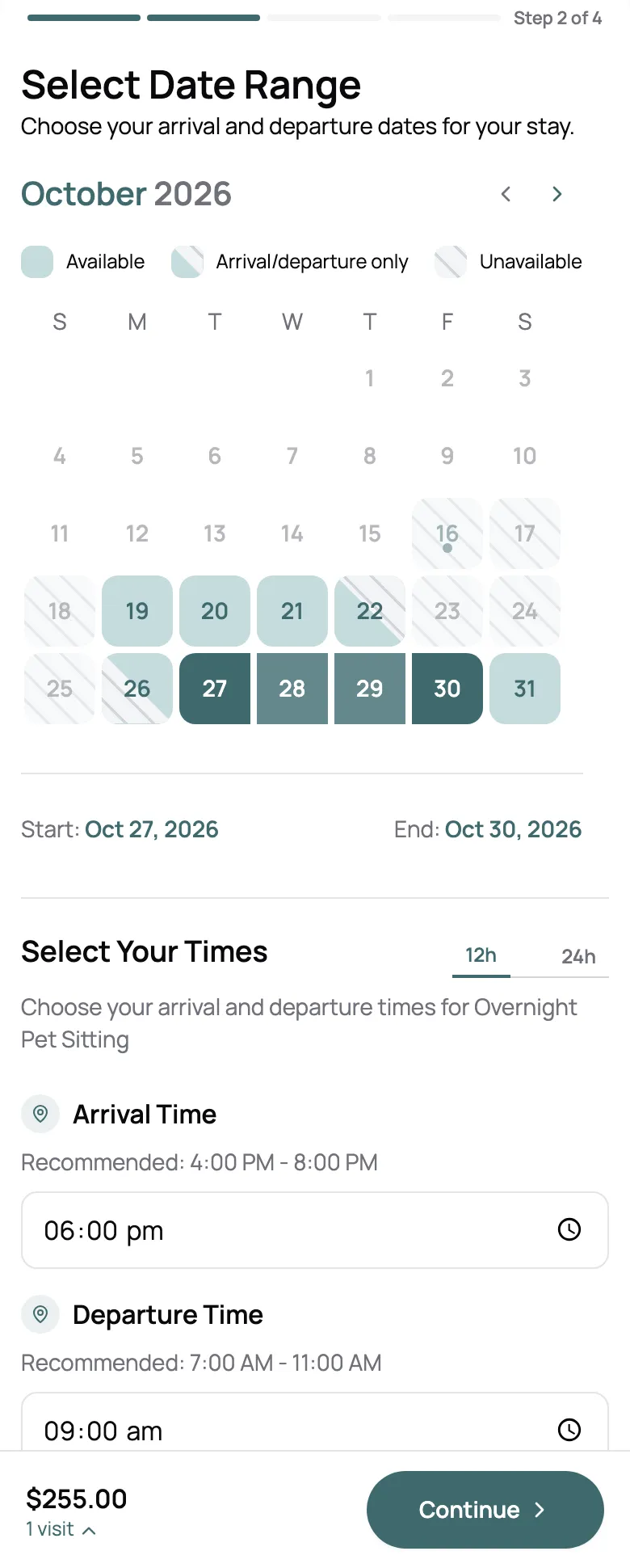
A ten-night house sit is one booking. The client picks drop-off and pick-up on your booking page, sees the price by the night, and books it in one go, as a request you confirm or instantly, your choice. It sits on your calendar as one stay. Sleeping at someone else’s house tonight? A stay can close your whole calendar for that night, while the pick-up day stays open for the next drop-off.
- Drop-off and pick-up times you set for each day
- Priced per night or per day, shown before they book
- One stay can close every other service that night
The house as well as the pets
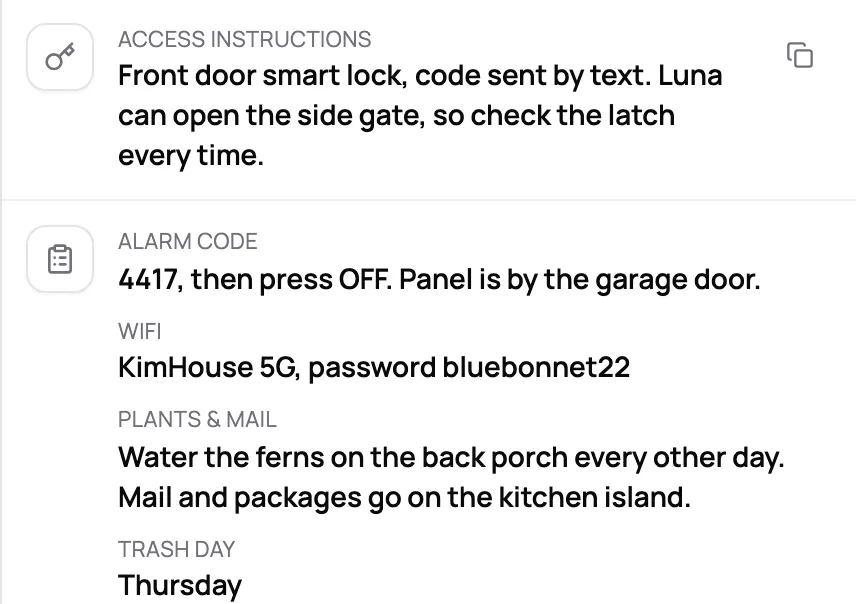
A house sit comes with an alarm code, the WiFi, plants to water, and a trash day. Keep all of it on the client’s profile, next to the pets’ feeding and meds. Access instructions and an emergency contact come with every profile, and you add your own fields for the rest, marked staff only when they should be. On Solo Pro and up, stays can have an intake form of their own.
- Access instructions and emergency contact, kept current by the client
- Your own fields for WiFi, the alarm, plants, and trash day
- An intake form just for stays
An update every day they’re away
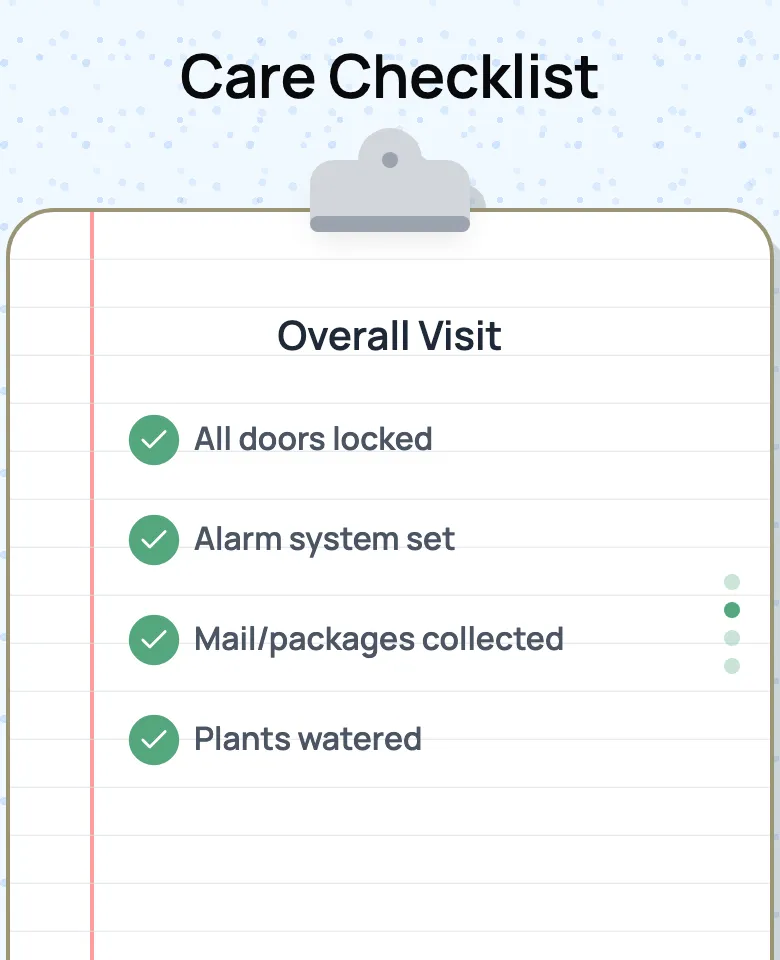
Owners on vacation check their phone for one thing. Every day of a stay gets its own report card: photos, how each pet ate and felt, and a house checklist with the alarm, the mail, the plants, and the trash. One card a day, wherever they are, from the first night to the last.
- A new report card for each day of the stay
- House checklist: alarm, mail, plants, trash, doors
- Photos, moods, and a note on every card

“Fantastic experience with the platform and great feedback from my clients all round. They find it very easy to book overnight pet sitting and also dog walking.”

Jake H.
Pet Sitter, Jake's Pet Pals
What a stay comes to, late pick-up included
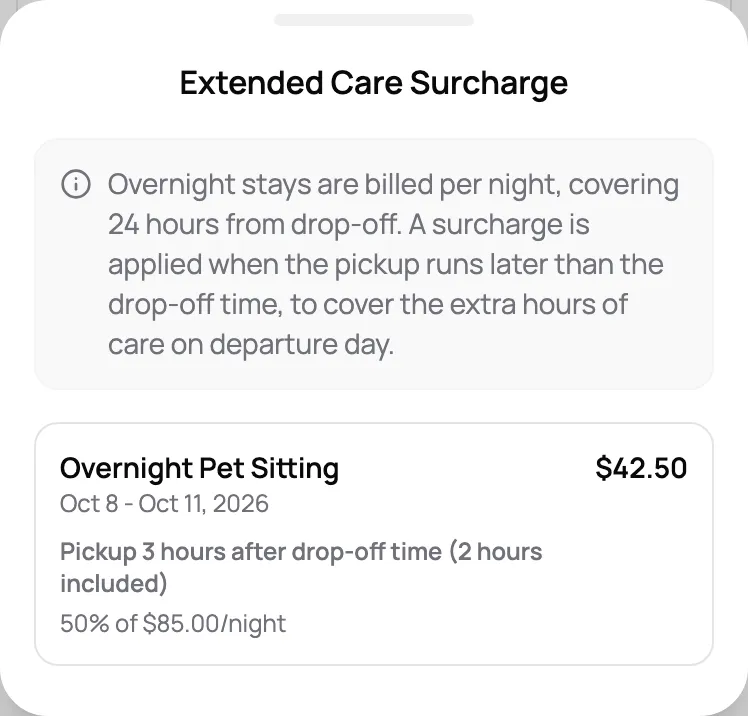
Nights only cover whole days. Drop off at 5 PM, pick up at 8 PM three days later, and those extra hours are on you. Scritches adds an extended care fee when pick-up runs past drop-off time by more than your grace period. Try it with your own rates.
See automated surchargesWhat the stay comes to
- Overnight stay3 nights × $85$255
- Extra pets1 pet × 3 nights × $15$45
- Extended care50% of a night for 3.0 extra hours on pick-up day$42.50
It explains itself on the invoice
The fee shows up as its own line, and the client can tap it to see why: how late pick-up ran, the hours you include for free, and the rate. Charge one rate, or set tiers so a couple of extra hours costs less than most of a day.
Everything an overnight pet sitting business runs on
Online booking
No-login booking that clients actually enjoy
Report cards
Turn every visit into a shareable memory
Client & pet CRM
Everything about every pet, right when you need it
Automated surcharges
Holiday, extra pet, and late pickup fees, applied for you
Invoicing & payments
Create invoices, accept payments, and track every transaction
Custom client rates
Give any client their own price, even when you raise yours
Forms & intake
Collect what matters to your business, automatically
Pet parent portal
One page for clients to see bookings, sign, and pay
Scheduling & availability
Block time, set availability, stay sane
Staff management
Assign visits, set permissions, and pay your team right
Digital agreements
Send contracts for signature and see who has signed
Review booster
Get more reviews where it matters, on auto-pilot
Frequently Asked Questions
It’s your call, set on each service. Per night counts the nights slept, so Friday to Monday is three. Per day counts every date from drop-off to pick-up, so the same stay is four. Only the dates count, not the times, which is what the late pick-up fee is for.
Turn on the extended care fee. When pick-up runs later in the day than drop-off by more than your grace period, it’s added to the stay once, as a share of a night or a flat amount. You can also set tiers, so a few extra hours costs less than most of a day.
Yes. On your booking page they pick a drop-off and pick-up date and time, see the price by the night, and book it as one stay. Take it as a request you confirm, or let it book instantly. You choose the drop-off and pick-up hours for each day of the week, and how much notice you need.
Yes. Set a limit of one stay a night and have it close your other services when it’s full, so nobody books a drop-in for a night you’re sleeping at a client’s house. The pick-up day stays open, so the next stay can start that evening.
On the client’s profile. Access instructions and an emergency contact come with every profile, and clients can keep them up to date from their portal. Add your own fields for the rest, like WiFi, the alarm, plants, and trash day, and mark them staff only when clients shouldn’t see them.
No. They book from your booking page in any browser, and sign in to your portal with a one-time code to see their stays, report cards, and invoices. There’s no password to remember.
Yes, on the Growth plan. Assign different nights of the same stay to different sitters, and each one gets their own login and schedule.